
- OpenCode plugin
- v0.8.1
- MIT
OpenCode Cache Manager
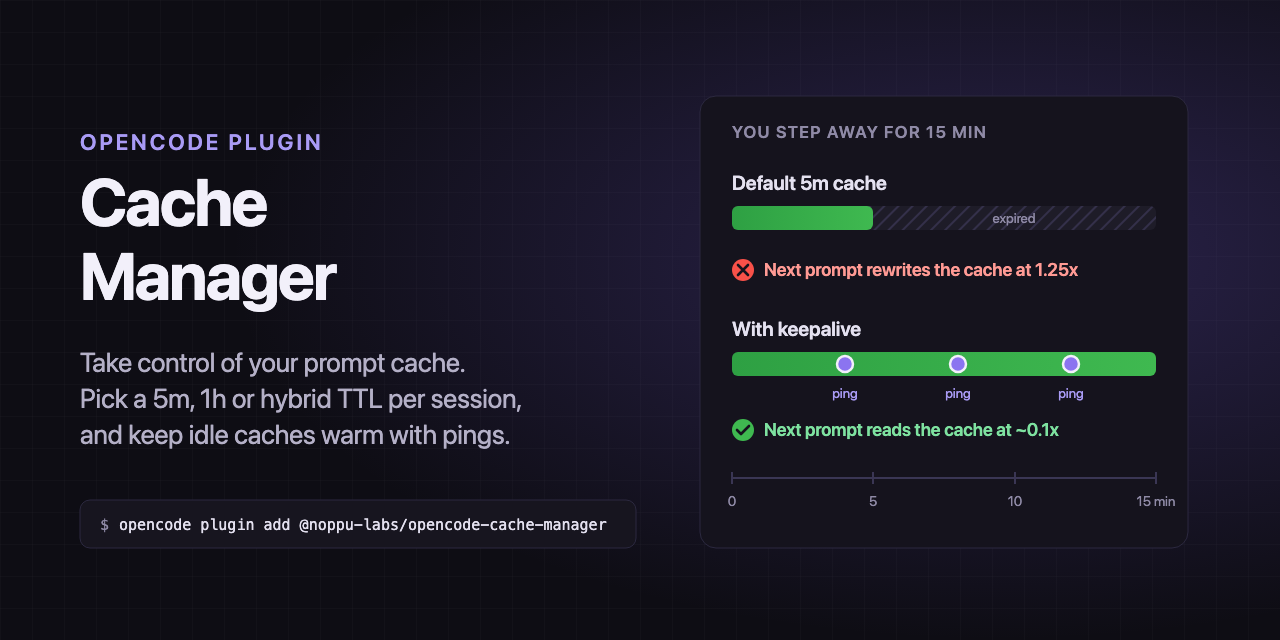
Take control of your prompt cache. Pick a 5m, 1h or hybrid TTL per session, and keep idle caches warm with pings so they don't expire while you're away.
opencode plugin add @noppu-labs/opencode-cache-manager
Also published unscoped as opencode-cache-manager. Run /cache-manager in the TUI to change a session's settings.
01 — What it does
Stop paying to rewrite the cache.
- ttl
A TTL per session
Switch any session to
5m,1horhybridwith/cache-manager. On Claude,hybridcaches tools and the system prompt for an hour and the message tail for 5 minutes. - keepalive
Keepalive pings
A hidden ping goes out shortly before the cache expires and restarts its TTL. Nothing is added to the conversation, and a ping costs about one cache read.
- limits
Pings that stop themselves
Keepalive stops after 5 pings in one idle stretch by default, and stops early when a ping misses the cache, so a provider that doesn't reuse it can't run up paid pings.
- sidebar
Cache status in the sidebar
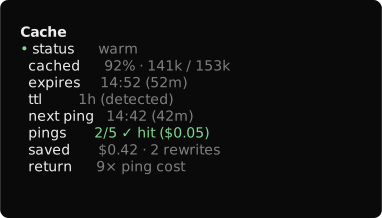
The OpenCode sidebar shows how much of the context is cached, when it expires, the next ping and what keepalive has saved.
- openai
GPT-5.6+ too
On GPT-5.6+,
1hasks for OpenAI's 12-hour cache, and one-off requests such as titles stop paying for cache writes. - proxies
Works through proxies
It handles the Anthropic Messages API, OpenAI Chat Completions and the OpenAI Responses API, on the official endpoints and through proxies such as OpenRouter and OmniRoute.
02 — How it works
What happens to each request.
- OpenCode builds the request. On Claude it marks its own cache breakpoints, always with a 5-minute TTL.
- The plugin rewrites the outgoing request to the session's mode, and adds the extended-TTL header Claude needs for
1handhybrid. - It reads the cache usage in each response. When the provider reports which TTL it granted, the sidebar and the ping schedule use that one.
- When the session goes idle, it schedules a ping just before the cache would expire. Your next real request cancels it.
03 — Requirements
What you need.
- OpenCode V2 2.0.22 or later
- A Claude or GPT-5.6+ model, through its official API or a proxy such as OpenRouter. Other models get only the cache readout unless
cacheProfilesmaps them to theanthropicoropenaiprofile.
{
  "plugins": [
    {
      "package": "@noppu-labs/opencode-cache-manager",
      "options": {
        "defaultMode": "1h",
        "keepalive": { "enabled": true, "maxPings": 5, "minContextTokens": 50000 }
      }
    }
  ]
}
04 — Questions
Before you install.
Do keepalive pings cost money?
Yes. Each ping is a real request that reads the whole context from cache, at about 0.1x the input price. It saves money when you come back after a long gap, and costs money for sessions you never return to.
Which models does it manage?
Claude and OpenAI GPT-5.6+, through their official APIs or proxies such as OpenRouter. Another model that takes Claude- or OpenAI-style cache breakpoints can be managed the same way through the cacheProfiles option. For the rest it only shows how much of each prompt was cached, and never pings.
Can I use it with OpenCode's warming option?
Use one or the other. With warming: true on as well, both would ping the same session and you'd pay for every ping twice.
Does it work on OpenCode V1?
No. It needs OpenCode V2 2.0.22 or later.
More OpenCode plugins
- opencode-permission-reviewerAn AI reviewer answers OpenCode's permission prompts. Routine actions go through, risky ones are blocked with a reason, and the rest come to you.
- reviewCode review skills for PHP, TypeScript, and Python: comment audit, writing comments, type-safety review, correctness review, a three-stage PR review orchestrator, and PR comments
- investigateDeterministic structural briefs and two-pass code investigations: brief, module, and spec review skills